Solutions / Outbound calling
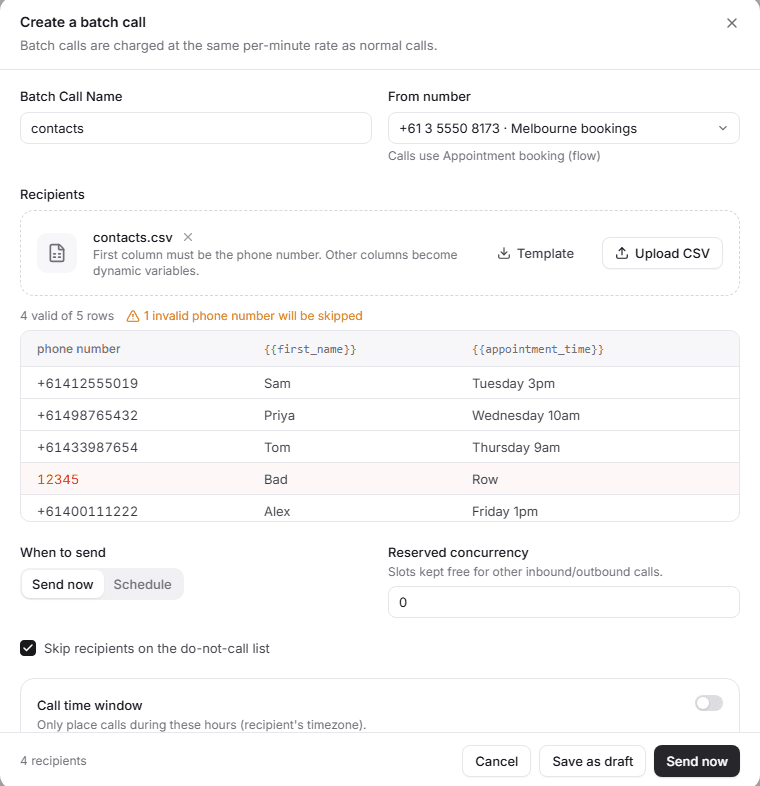
Upload a spreadsheet. Every row gets a call.
Add a list of numbers with any details you want the agent to use, like first name or appointment time. Schedule it, set calling hours and keep lines free for incoming calls.
Outbound call
+61 4 9876 5432
Agent: Hi Priya, this is a reminder from Bondi Physio about your appointment on Wednesday at 10am.
Agent: Can you still make it?
Caller: Can I move it to the afternoon?
- Checking Wednesday afternoon in the calendar
Agent: I have 2:15 or 3:30 on Wednesday. Which would you like?
Caller: 3:30.
Illustration of an example call.
What the agent does
The job, step by step.
- Typical setup
- List
- contacts.csv, 4 valid rows
- Uses
- First name, appointment time
- Calling hours
- 9am to 7pm, their time zone
- Voicemail
- Leave a message, then hang up
- 01
Personal every time
Columns like first name and appointment time are used on each call.
- 02
Calling hours
Only call during the hours you set, in each person's time zone.
- 03
Voicemail
The agent knows when voicemail picks up and leaves a short message or hangs up, as you choose.
- 04
Keep lines free
Keep some lines for incoming calls so your list never ties up your main number.
After the call
Every call, summed up.
When the call ends you get a short summary, how the caller felt, whether the call did its job, and the details you asked for, ready to send to your other systems.
Call summary
Summary
Patient could not make Wednesday 10am. Moved to Wednesday 3:30pm and confirmed.
Details captured
- Kept original timeNo
- Moved toWed 3:30pm
- VoicemailNo
In the dashboard
Set up in the Tried dashboard.
Questions
Something missing? Email hello@tried.com.au.
How are call lists billed?
At the same per-minute price as any other call, billed per second.How many calls run at once?
20 calls at once are included, and you can add more lines. Keep some free for incoming calls.Can I see how each call went?
Yes. Every call has its recording, transcript, summary and outcome.
Other use cases
- AI receptionistAnswers every call, handles common questions and puts callers through or takes a message.
- Appointment bookingBooks, moves and cancels appointments in your calendar while the caller is on the line.
- Lead qualificationCalls new leads within minutes, asks your questions and puts the good ones through to sales.
- Customer supportAnswers common support questions, looks up orders and passes the rest to your team.

Have you Tried it yet?
Create an account, pick a template and talk to your new receptionist in the browser. You only pay for the minutes you use.